Spyware Process Detector
Anti-spyware software to detect and remove spywares, trojans and viruses from your PC
Current version: 4.06 |
|
|
|
What is Spyware Process Detector
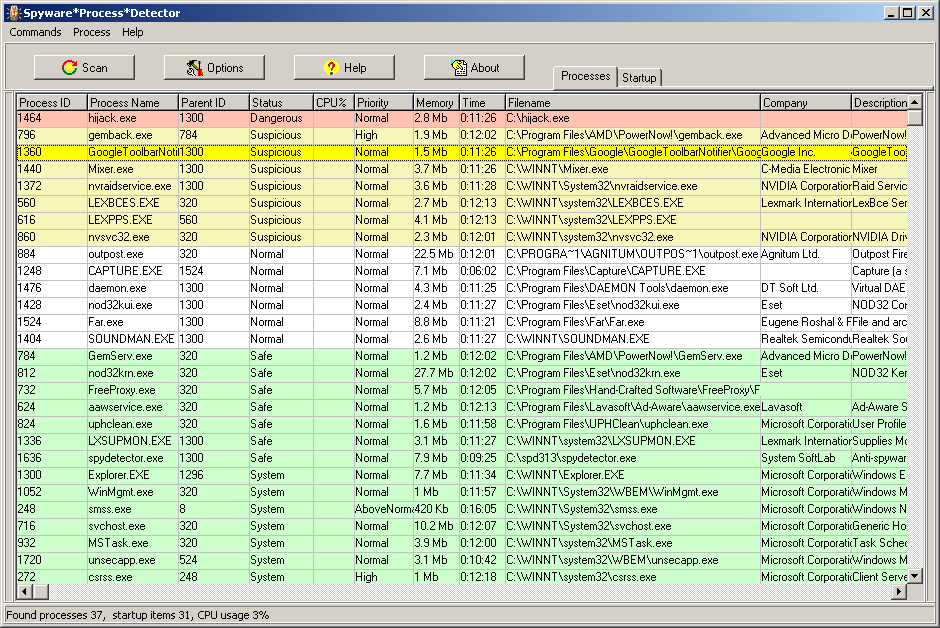
Spyware Process Detector is an anti-spyware tool that will detect all processes running on the computer and display their threat rating based on the intelligent analysis of all hidden properties. Another specialty of the program is its ability to detect a process that contains and executes alien code of another process. Users will at a glance see the detailed information about any selected process and detect all hidden threats, including spyware, malware, keyloggers and Trojans. 17 methods of process detection are available.
Unlike standard Windows Task Manager, Spyware Process Detector will detect even those processes and tasks, which are transparent to OS. The security rating is color-coded so that users can see the most dangerous processes at once. Red stands for the highest rating of danger, green for the lowest one, any color between red and green stands for varying levels of security threat.
The program shows other details about each process, such as process ID, parent ID, security status, EXE filename, file path, description, etc.
Startup Manager shows details information about processes that run on Windows startup.
Once there is a process marked out as red or yellow, users have to choose whether to delete it or mark as safe. The current list of processes can be exported to the Excel format for further analysis.
The program detects new (undetectable by your anti-virus scanner) spywares, trojans and viruses. We recommend to use our program instead of standard Windows Task Manager with your anti-virus together.
You lose nothing if you download TRIAL Edition of this program.
|
Full SPD online documentation. Click here!
|
|
Registration
This is a 14-day TRIAL version. You can purchase a full version for only $19.90. Free upgrades for all minor versions.
You can on-line register at www.systemsoftlab.com/purchase_spydetector.html
|
|
System Requirements
- Operating systems Microsoft Windows XP/2003/Vista/2008/7/8/2012/10/2016/11/2022 x86/x64
- Intel Pentium II processor or higher (Intel Pentium III processor or higher recommended)
- 512MB of RAM or above (1Gb or above recommended)
- Up to 30MB of available hard-disk space
|
|
Screenshots
|
|
|
What is new in 4.06 ( February 10, 2025 )
- Full support for Microsoft Windows 11 Update 24H2 and Windows Server 2025 Preview.
- Fixed crash bug on Windows 10/11 and Windows Server 2022.
|
What is new in 4.05 ( May 1, 2024 )
- Optimization of kernel service, it uses less CPU time and memory. Now the program does not freeze with several thousand processes in the system.
- Fixed bug with detection of status on Windows 10/11. The program detected some processes as Dangerous instead of Suspicious.
|
What is new in 4.04 ( March 6, 2024 )
- Now the program changes heigth of rows in a table automatically. Added hotkeys (ALT+Up/ALT+Down) to change the heigth of rows in a table manually.
- Added the detection of special system processes - Registry and Memory Compression for Windows 10 Anniversary Edition or higher.
- New method of detection for process file name (without OpenProcess).
- Fixed bug with the detection of system processes.
- Fixed crash bug on Windows 10 x64.
|
What is new in 4.03 ( January 27, 2024 )
- Now you don't need administrator rights to display startup processes from registry entries.
- Also now you don't need administrator rights when you check a process file in VirusTotal Uploader.
- Improved detection of system processes on Windows 10/11.
- Fixed bug with empty window when the program works with ArtMoney.
- Fixed bug with service initialization on 32-bit systems.
|
What is new in 4.02 ( October 11, 2023 )
- Optimization with background system scan. Now background scan uses less CPU time and memory.
- New method of detection for process file name.
- Fixed bug when program displays wrong module list.
- Fixed bug when program found a new process.
|
What is new in 4.01 ( May 5, 2023 )
- Full support for VirusTotal Uploader 2.2.
- Fixed crash bug when the program has found a process with full file name more then 512 characters.
- Fixed bug with the program freezing on Windows x64.
- Fixed bug with updating the database via the internet.
- Fixed many bugs.
|
What is new in 4.00 ( January 1, 2023 )
- Full support for Microsoft Windows 11 and Windows Server 2022.
- Full support for unicode file names in NTFS file system, for unicode service names and registry parameters.
- Now 32-bit and 64-bit versions are available. New system requirements: Windows XP SP2 or higher!
- Now you can update the database via the internet (only for registered users). If user has marked the process as Safe, then this process sended to server. If few users mark this process, then server will add it to database of good processes.
- One process detection method was remaked, one was deleted, two was unions with another methods. Now the program has 14 methods of process detection (6 runs in kernel mode via service).
- Now you can create Unicode language plugin for arabic, chinese or japan language! Unicode language plugin will normally display in any Windows even if language did not install. For example, chinese language on an english Windows.
- New version stores the database in c:\Program Data\Spyware Process Detector
- The program can work with ArtMoney 8.14 or higher together as process selector.
- Fixed bug with detection of DLL filename that runs inside Rundll32.exe process on Windows x64.
- Fixed bug when the program has found non-existent processes on Windows x64.
- Fixed crash bug on Windows 10 x86 Update 2004 or higher.
|
What is new in 3.24 ( September 10, 2015 )
- Full support for Microsoft Windows 10 and Windows Server 2016 Technical Preview.
- Added "Check for new versions" option (only for registered users). Program with this option will check for new versions on site and display notification window.
- Fixed crash bug with empty startup filename.
- Fixed bug with apostrophe in file name.
- Fixed crash bug on Windows 8.1.
- Fixed crash bug on Windows 7.
|
What is new in 3.23 ( September 18, 2012 )
- Full support for Microsoft Windows 8 and Windows Server 2012.
- Updated URL for VirusTotal Uploader 2.0
- Fixed bug with crash when you enter into Antivirus Kaspersky Account.
- Fixed crash bugs on Windows XP SP3 and Windows 2008 R2.
- Fixed many bugs.
|
What is new in 3.22 ( March 5, 2011 )
- New command "Set affinity". The processor affinity setting controls which CPUs(COREs) the process will be allowed to execute on.
- New command "Remember this processor affinity" to hold a processor affinity of selected process after restarting.
- Full support for VirusTotal Uploader 2.0. This is a useful, free and small program that enables you upload files to www.virustotal.com and determine the presence of viruses or malicious software that could do considerable damage to your computer.
- Now we use one registration code. No more keyfiles and passwords! It simplifies procedure of registration. In addition, some email servers (including gmail.com) mark as spam letters with attached keyfiles.
- Updated our database of good processes.
- Fixed many bugs.
|
What is new in 3.21 ( July 1, 2010 )
- Added "Automatically delete dangerous startup items" option. It is special anti Trojan.Winlock option. Trojan.Winlock blocks your computer and demands that you send an SMS as a ransom.
- Remaked "Always on Top" mode to struggle with Trojan.Winlock.
- New sign of suspicious process - "Process file name looks like system name".
- Now If program can not delete a process then it ask to block starting of the process by filename.
- Fixed many bugs.
|
What is new in 3.20 ( November 3, 2009 )
- Full support for Windows 7 RC (Build 7100) and Windows 7 RTM (Build 7600).
- Now SPD can detect hidden threads and can delete it correctly.
- Added new option "Get information about threads from ETHREAD kernel structure" in "Threads" page of process information. Added ETHREAD column to table of threads.
- Added EPROCESS column to table of processs. The column contains unique address of EPROCESS kernel structure.
- Now you can view a name of dynamic link library (DLL) that runs inside Rundll32.exe process.
- Fixed bug on Windows Vista/2008 without Service Pack.
|
What is new in 3.19 ( October 7, 2009 )
- Fixed bug with "Always on Top" mode.
- Fixed crash bug on Windows XP/VISTA.
|
What is new in 3.18 ( October 3, 2009 )
- Added a database of good processes. We will add an automatic update of the database in next versions. You can see a date of last database update in "About" window. Now SPD paints a system process, a safe process and a good process with different shade of green.
- Improved detection of status. Improved detection of hidden processes on Windows Vista/2003/2008.
- Added "Check this file for viruses with Virustotal.com" command in context menu. Download and install VirusTotal Uploader (vtsetup.exe 80KB) to upload files to www.virustotal.com. This is a useful, free and small program that enables you upload files to www.virustotal.com and determine the presence of viruses or malicious software that could do considerable damage to your computer. Please visit www.virustotal.com/metodos.html to download.
- Added "Run a new process" command.
- Added "Block starting of the process by filename" command in context menu. It is works permanently, when SPD is not running or even deleted.
- Added "Block starting of the process by filepath" command in context menu. It is works only when SPD is running.
- You can view or edit blocked processes via "List of Blocked Processes" in "Commands" menu.
- Removed "Scan for changes in threads and in code of processes" option.
- Fixed bug when SPD program is deleted, but SPD service is still present and writes a error message in system log.
- Fixed bug with DPI setting. That shows up only when you set your computer into the non standard font mode (standard is 96 dpi).
- Fixed crash bug on Windows XP with multi-core processor.
- Fixed crash bug on Windows 2003 Service Pack 2.
- Fixed bug on Windows XP without administrative rights.
|
What is new in 3.17 ( July 30, 2009 )
- Full support for Microsoft Windows Server 2008 and Windows 7 Beta.
- Background scan uses less CPU time.
- Fixed a conflict with last version of Agnitum Outpost Firewall.
- Now the program can open a protected process on Windows Vista/2008/7 x86. You can delete it and can view the detailed process information.
|
What is new in 3.16 ( May 18, 2009 )
- New command "Hold priority" to hold a priority of selected process. If a process changes the priority then SPD will change it back.
- Added "First found date" column. The column contains date and time of first detection of processes.
- Fixed bug with calculation of process hash (checksum) on Windows Vista.
- Fixed bug with detection of priority of hidden processes
|
What is new in 3.15 ( March 21, 2009 )
- Support for Microsoft Windows XP/2003/Vista x64. The program works without service. 7 methods of process detection are available.
- Renamed filenames and objects of program, because some new trojans detect SPD by names.
- Fixed bug on Windows Vista without Service Pack.
- Added czech interface plugin.
|
What is new in 3.14 ( December 31, 2008 )
- Added "Mean CPU usage" column. This column shows how much percent this process has used the CPU. You can identify processes that use much CPU time over a longer period.
- Fixed many bugs.
|
What is new in 3.13 ( December 10, 2008 )
- Added a startup manager (new tab on main form). The startup manager shows all processes that run on Windows startup.
The program examines each startup item and assignes status of the item (rating of danger).
You can open details information about each startup item, delete, create item or mark it as safe.
- Added "Startup item information" window with details information about startup item.
It includes item place, item name, file name, value, status, reason of status, state, date/time of first finding, company, description and other detailed file information.
- Added "Monitors for new startup items" and "Popup SPD when found the following startup items" options.
SPD will popup when found new or dangerous startup item.
- Improved detection of status. Fixed bugs.
|
What is new in 3.12 ( April 25, 2008 )
- You can get a full-licensed version of Spyware Process Detector for FREE when you try or buy any product from our trusted partners. In return for sending them a new customer (that's you), they will pay your software registration fee. Just follow the advertiser's instructions and you will receive a fully licensed version for FREE! Click here to try!
- Now SPD shows memory usage and work time of hidden processes.
- New option "Scan for changes in threads and in code of processes".
- Fixed crash bug when a process runs itself many times.
- Fixed bug when a dead process looks as alive.
|
What is new in 3.11 ( January 1, 2008 )
- Added "Maximum Memory Usage" column. There you see how much memory the process has maximum used. This might be helpful increasing the speed of your system if you identify processes that need much memory.
- Added "CPU Time" column. This column shows how much time this process has used the CPU at 100%. You can identify processes that use much CPU time over a longer period.
- New option "Show CPU Time for System Idle Process". This process runs while your machine is idle. The CPU Time of this process is the time spent in idle.
- Added "Domain" column.
- Fixed many bugs.
|
What is new in 3.10 ( October 3, 2007 )
- German language support. German plugin has been added. Special thanks for translation to Oliver Sahr. You can select the language of the interface and manual while installation.
- Added commands Save and Load the process. You can use it for saving in a game, if the game has no save function. Read the manual for details about this functions. You can load processes in the Trial version for a maximum of Three (3) times only.
- Now you can set the filter on Type field in Handles page of process information.
- Fixed bugs.
|
What is new in 3.09 ( September 25, 2007 )
- Now SPD stores username and date-time when user marks a process as Safe or as System. You can view it in reason when you open process information window.
- If system process hash (checksum) has been changed then you can mark this process as System again. System process hash can be changed when you install Service Pack or Windows Hotfixes.
- Now SPD can work without administrative rights. But SPD installation needs administrative rights.
- Fixed crash bug on Windows XP.
- Optimization of memory usage.
- Improved analysis of threads.
|
What is new in 3.08 ( September 20, 2007 )
- Improved detection of status. Fixed bugs.
|
What is new in 3.07 ( September 19, 2007 )
- Added background system scan. SPD will popup when found dangerous process.
- New "Scan" page in options. Scan page contains "Scan on program start" and "Background system scan". Also you can select a type of process and SPD will popup when found it.
- New options "Use own functions - ReadProcessMemory and WriteProcessMemory".
- Fixed bugs.
|
What is new in 3.06 ( September 15, 2007 )
- New spyware detection methods. Now SPD catches a spy that replaced a system process.
- Now SPD uses calculated process hash (checksum) to assign status for a process.
If process hash has been changed then the process status will become ALTERED.
Altered process is potentially dangerous.
- Added process Hashes in database. Now SPD encodes database files.
- Added columns to table of windows - Minimized, Position X, Position Y.
|
What is new in 3.05 ( September 12, 2007 )
- Added menu command "Always on Top". The command makes SPD window always on top.
- New option "Replace Windows Task Manager". If you like SPD, you can replace Windows Task Manager with it.
- New option "Scan on program start". When you launch SPD then it immediately scan your system.
|
What is new in 3.04 ( September 9, 2007 )
- New option "Show CPU usage for System Idle Process". This process runs while your machine is idle. The CPU usage of this process is the percentage of time spent in idle.
- Now SPD shows total CPU usage in status bar.
- Fixed bug with module detection of window.
- Fixed memory leak.
|
What is new in 3.03 ( September 3, 2007 )
- New detailed process information dialogue. Special thanks for design to Oliver Sahr.
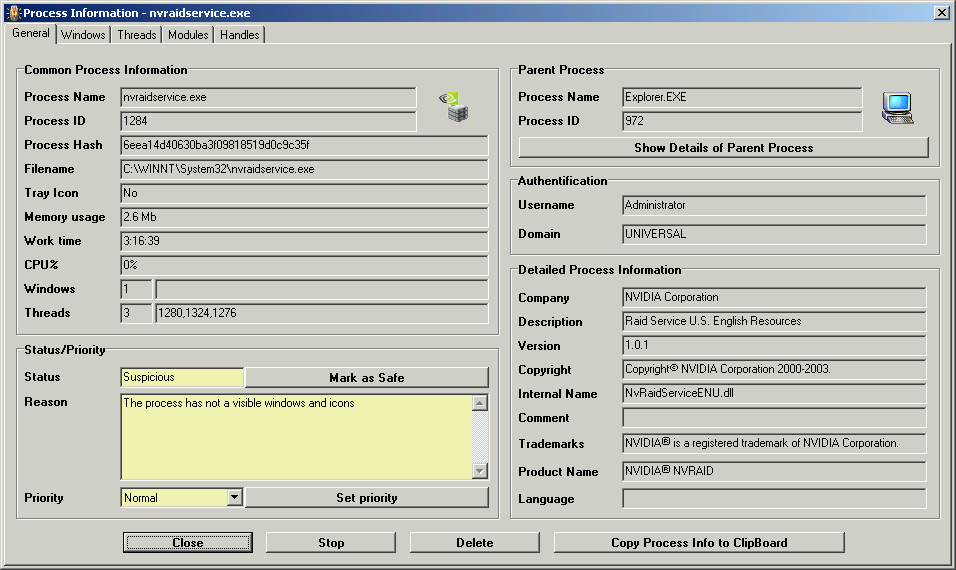
New dialogue contains five pages with process information.
General information on first page. Added buttons "Copy Process Info to ClipBoard" and "Show Details of Parent Process".
- Added fields - Reason of status, Process Hash, Version, Copyright, Trademarks, Language.
Added icons of selected process and parent process.
- New page "Windows" contains detailed information about windows of a process (Title bar, Class, Parent, Visible, Active, Module).
You can show or hide a window, activate, destroy it. And special feature - You can change window title.
- New page "Threads" contains detailed information about threads of a process (Thread ID, Creation time, Start address, Priority, State, Wait reason, Context switch count, Kernel time, User time).
You can stop or resume a thread, change priority, destroy it.
- New page "Modules" contains detailed information about loaded modules in a process (Module name, filename, Address, Size, Entry point, Company, Description).
- New page "Handles" contains detailed information about opened handles of a process (Type, Name, Address). You can view all opened files by the process.
- Fixed crash error when you running SPD for the first time on Windows XP.
|
What is new in 3.02 ( July 23, 2007 )
- Improved detection of Rkdemo Rootkit and other rootkit processes.
- Added french and bulgarian interface plugins.
- Fixed bugs.
|
What is new in 3.01 ( June 15, 2007 )
- Improved detection of hidden processes. New detection method.
- New columns - Username, Filename of parent process.
- Program shows CPU usage of hidden processes.
- New option "Use own function - OpenProcess". Set it to receive more information about hidden processes.
- New option "Use own function - TerminateProcess". Set it to delete a protected process.
|
What is new in 3.00 ( June 5, 2007 )
- Refresh process information. You can change refresh interval in options. The program detects new and terminated processes.
- New columns - CPU usage, memory usage, work time, process priority.
- Constructor of processes list. You can change a position and visibility of any column.
- New command "Set priority" to change priority of selected process.
- Tray icon like Task manager with the graphical representation of processor usage. When you move a mouse on tray icon, you can see a list of applications that use much processor time at this moment.
- New option "Run on Windows startup". The program will launch automatically when Windows restarts.
- Trial period was increased to 14 days.
- Fixed bugs.
|
|
|
|